The best AI social media schedulers for small teams in 2026
Quick answer
For a small team posting on several networks, the best AI social media scheduler writes the first draft, plans the week and posts on time without you logging in to each app. As of October 2026, SocialBee sorts posts into content categories with repeating time slots and an AI Copilot that drafts a plan, Blotato turns links, PDFs and text into posts and visuals and plugs into n8n and Make, Buffer keeps a simple queue with an AI Assistant that rewrites posts per platform, Hootsuite adds trend-based ideas, an inbox and competitor analytics, and Later is strongest for visual planning with a feed preview and Link in Bio.
Last updated
Take the free module →Module 6 of the free AI Apps Worth Knowing course, about 12 minutes. No account needed.
This list is for marketing coordinators, agency staff and owners who post for a business every week. Features come from each vendor's own pages as of October 2026, with no prices, because plans change often. Tools with a free Stepthrough lesson come first; that is not a ranking. Disclosure: Stepthrough has an affiliate relationship with SocialBee. There are no affiliate links on this page. Practise for free in Plan a Week of Social Posts in One Sitting using SocialBee.
How do they compare at a glance?
| Tool | Best for | AI features the vendor lists | Networks the vendor names |
|---|---|---|---|
| SocialBee | A steady mix of post types every week | AI Post Generator for captions, hashtags and images; Copilot drafts a content plan from your website | Facebook, Instagram, X, LinkedIn, Pinterest, TikTok, YouTube, Threads, Bluesky, Google Business Profile |
| Blotato | Repurposing and automated posting | Turns YouTube links, articles, PDFs, audio or text into posts; makes carousels, infographics and avatar videos | X, LinkedIn, Facebook, Instagram, TikTok, YouTube, Threads, Bluesky, Pinterest |
| Buffer | A simple queue for a small team | AI Assistant brainstorms, rewrites, changes tone and adapts one post for each platform | Instagram, Facebook, TikTok, LinkedIn, X, YouTube, Threads, Pinterest, Google Business Profile, Bluesky, Mastodon and more |
| Hootsuite | Teams that also manage messages and competitors | Wisdom (formerly OwlyWriter AI) writes posts, suggests trend-based ideas, hashtags and content calendars | Not listed on the pages checked |
| Later | Visual planning for Instagram and TikTok | AI caption and content writer | Instagram, Facebook, Pinterest, TikTok, LinkedIn, Threads, YouTube Shorts, Snapchat |
What should an AI social media scheduler do?
Three jobs. Draft: turn one idea into a post for each network, in your voice. Plan: fill a calendar so you are not deciding what to post every morning. Publish: post at the right time on every network without you being there. As of October 2026, all five tools here list AI writing help and scheduling; they differ on how the plan is built and how much they automate.
SocialBee plans by content category, such as tips, testimonials and promotions, each with its own time slots, so the mix stays balanced. Buffer and Hootsuite use a queue of set times. Blotato posts now, at a set time or in the next open slot. The social media scheduler entry covers the basics.
Which tool is best for turning one piece of content into many posts?
Blotato is built around it. It lists turning YouTube links, articles, PDFs, audio or text into ready-to-post content, plus infographics, carousels and AI-avatar videos, as of October 2026. Buffer's AI Assistant also reworks one post into several formats and adjusts it per platform. The content repurposing entry explains the approach.
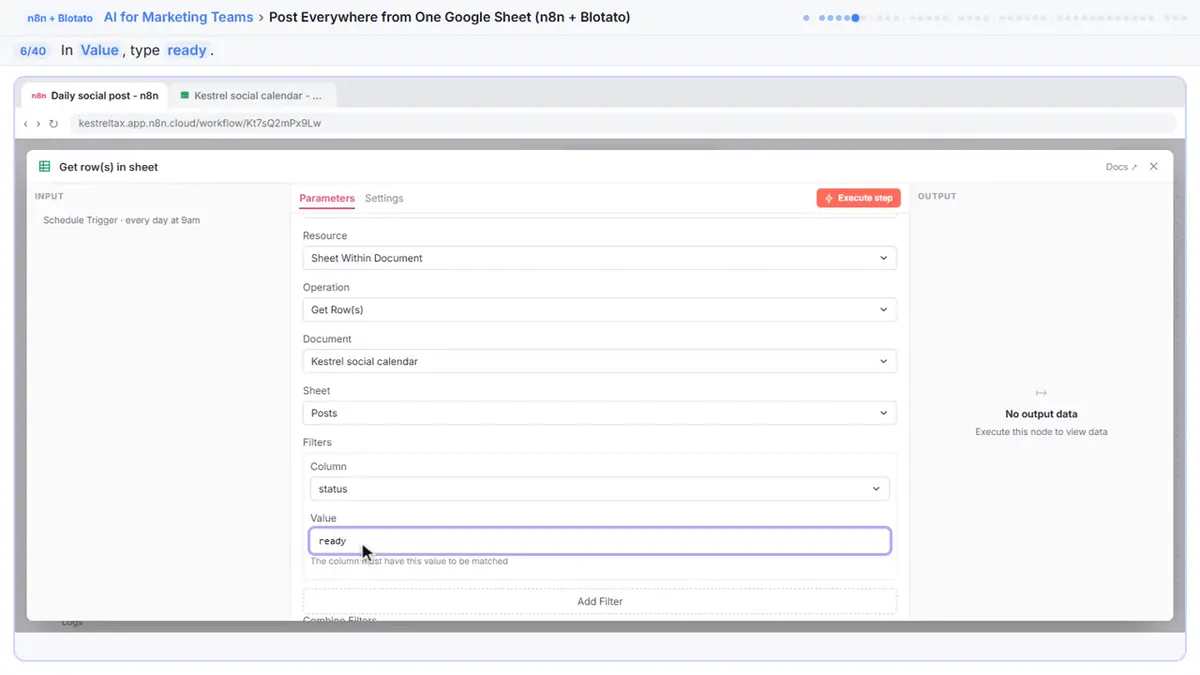
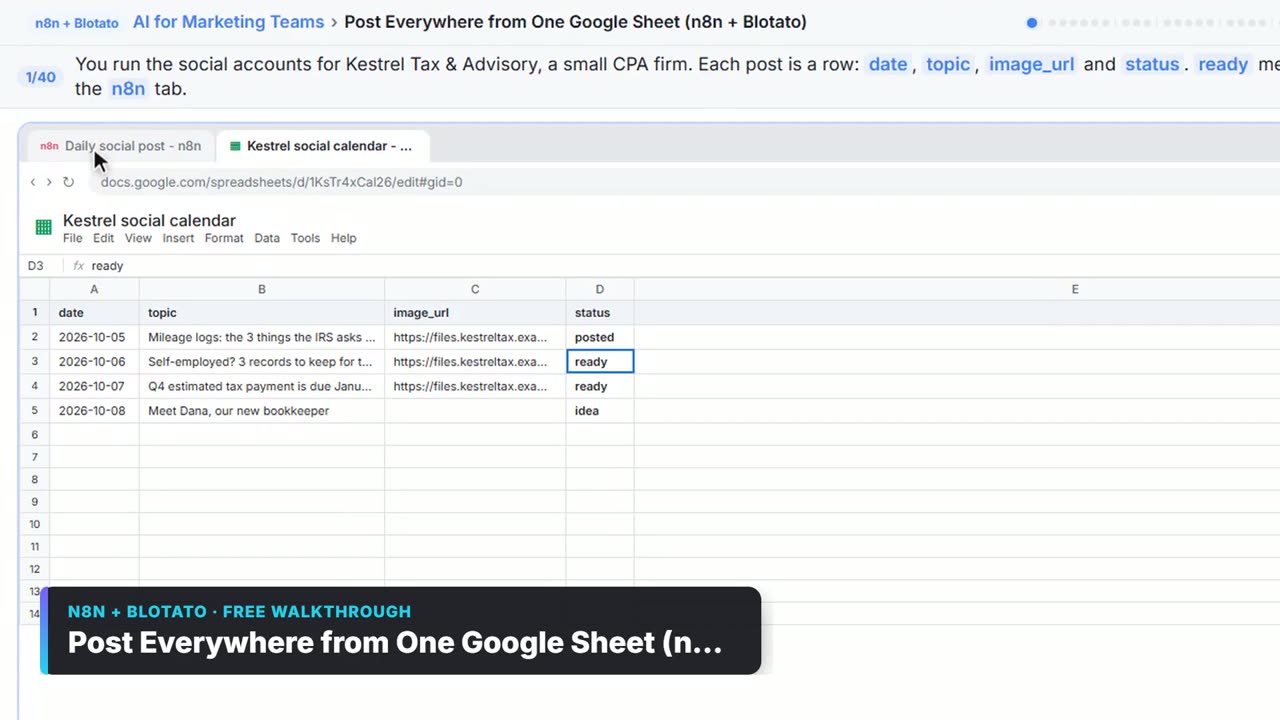
If you want posting fully automated, Blotato lists n8n and Make nodes and an API. The free Post to Every Channel Daily from One Sheet using n8n + Blotato lesson builds a workflow that reads a Google Sheet and posts each row.
Does a small business need analytics and a social inbox?
Analytics, yes, a little: you need to know which posts get results so you can make more of them. SocialBee lists cross-platform analytics with PDF reports, Buffer lists basic to in-depth reports, Hootsuite lists top content, best time per network and competitor comparison, and Later lists post-level analytics and competitor benchmarking.
A shared inbox for comments and DMs matters once replies start to pile up. Hootsuite and Later both list one, and Hootsuite adds automated Instagram DMs. For turning comments into booked calls, see the free Manychat: Instagram comments to consultations lesson.
How do you keep AI-written posts from sounding generic?
Give the tool your real material: a client result, a photo from the job, a question a customer asked this week. Then edit every draft before it is scheduled. AI is fast at turning one good idea into five formats; it cannot supply the idea or the facts. A short brand voice note, saved once, helps every draft. The brand voice entry shows what to include.
Who is each one for?
SocialBee
For small teams that want a balanced weekly mix by content category, with an AI Copilot that drafts the plan and posts from your website. Practise free in Plan a Week of Social Posts in One Sitting using SocialBee. Official site: socialbee.com. Directory card: SocialBee.
Blotato
For repurposing long content into posts and visuals and for automated posting from n8n, Make or a sheet. Practise free in Post to Every Channel Daily from One Sheet using n8n + Blotato. Official site: blotato.com. Directory card: Blotato.
Buffer
For a simple queue across many networks, including Mastodon and Bluesky, with an AI Assistant that rewrites a post for each platform. Official site: buffer.com. Directory card: Buffer.
Hootsuite
For teams that also handle messages and watch competitors: trend-based ideas, a shared inbox, suggested posting times and competitor analytics. Official site: hootsuite.com. Directory card: Hootsuite.
Later
For visual brands planning Instagram, TikTok and Pinterest with a drag-and-drop calendar, feed preview and Link in Bio. Official site: later.com. Directory card: Later.
Which of these tools have a free Stepthrough lesson?
- SocialBee: free lesson: Plan a Week of Social Posts in One Sitting using SocialBee
- Blotato: free lesson: Post to Every Channel Daily from One Sheet using n8n + Blotato
- Buffer: a free Stepthrough lesson is coming.
- Hootsuite: a free Stepthrough lesson is coming.
- Later: a free Stepthrough lesson is coming.
Practice it free, step by step
Plan a Week of Social Posts in One Sitting using SocialBee. Stop posting in bursts. Let SocialBee’s AI Copilot plan a week of posts for a small firm, sort them into content categories and lay them out on the calendar, with every post held as a draft until… You do every step yourself in a practice copy of SocialBee, it checks your work as you go, and “Do it for me” finishes any step you get stuck on. Free, and nothing touches your real accounts.
Start the free lessonWatch it in a free lesson: Post to Every Channel Daily from One Sheet using n8n + Blotato
 3:26
3:26Post to Every Channel Daily from One Sheet using n8n + Blotato: video walkthrough
Plan posts in a Google Sheet. Every morning n8n takes the next row marked ready, has AI write an Instagram, Facebook and TikTok caption, posts through Blotato and marks the row posted. The whole lesson narrated step by step, recorded in Stepthrough’s simulated practice environment.
Key takeaways
- Pick a scheduler that drafts, plans and publishes; as of October 2026 all five here list AI writing help.
- SocialBee balances post types by category; Blotato repurposes long content and automates posting through n8n or Make.
- Buffer is the simple queue; Hootsuite adds an inbox and competitor analytics; Later is strongest for visual planning.
- Feed the AI your real results and edit every draft before it is scheduled.
Frequently asked questions
What is the best AI tool to schedule social media posts?
For a balanced weekly plan, SocialBee; for repurposing and automation, Blotato; for a simple queue, Buffer. Try the planning routine in the free SocialBee lesson.
Can AI write my social media posts?
It can write good first drafts. All five tools list AI writing help as of October 2026. Edit each draft so it has your facts and your voice before it posts.
Which social media scheduler posts to LinkedIn?
SocialBee, Blotato, Buffer and Later all name LinkedIn as of October 2026. Hootsuite's pages that we checked did not list networks, so check its site.
Can I automate posting from a spreadsheet?
Yes. The free n8n + Blotato lesson reads rows from a Google Sheet and posts them on a schedule.
Where do these prices and features come from?
Every price and feature on this page was checked against the vendor's own page, as of October 2026. No numbers here are estimates or third-party figures. The example businesses in the Stepthrough lessons are made up.