Why this matters
Clients, banks, landlords and HR send PDF forms that must come back signed, and most are flat: you cannot type in them. Printing, signing and scanning is slow at the desk and impossible on the road, and a vendor form that waits means an invoice that waits.
Foxit PDF Editor's Fill & Sign puts text and check marks wherever you click on any PDF, and lets you make a signature once and place it. Foxit's site says non-interactive forms can be completed this way with no printing or scanning.
Practice
Do every step yourself in a practice copy of the real tool. It checks your work, and “Do it for me” finishes any step you get stuck on.
What you’ll build
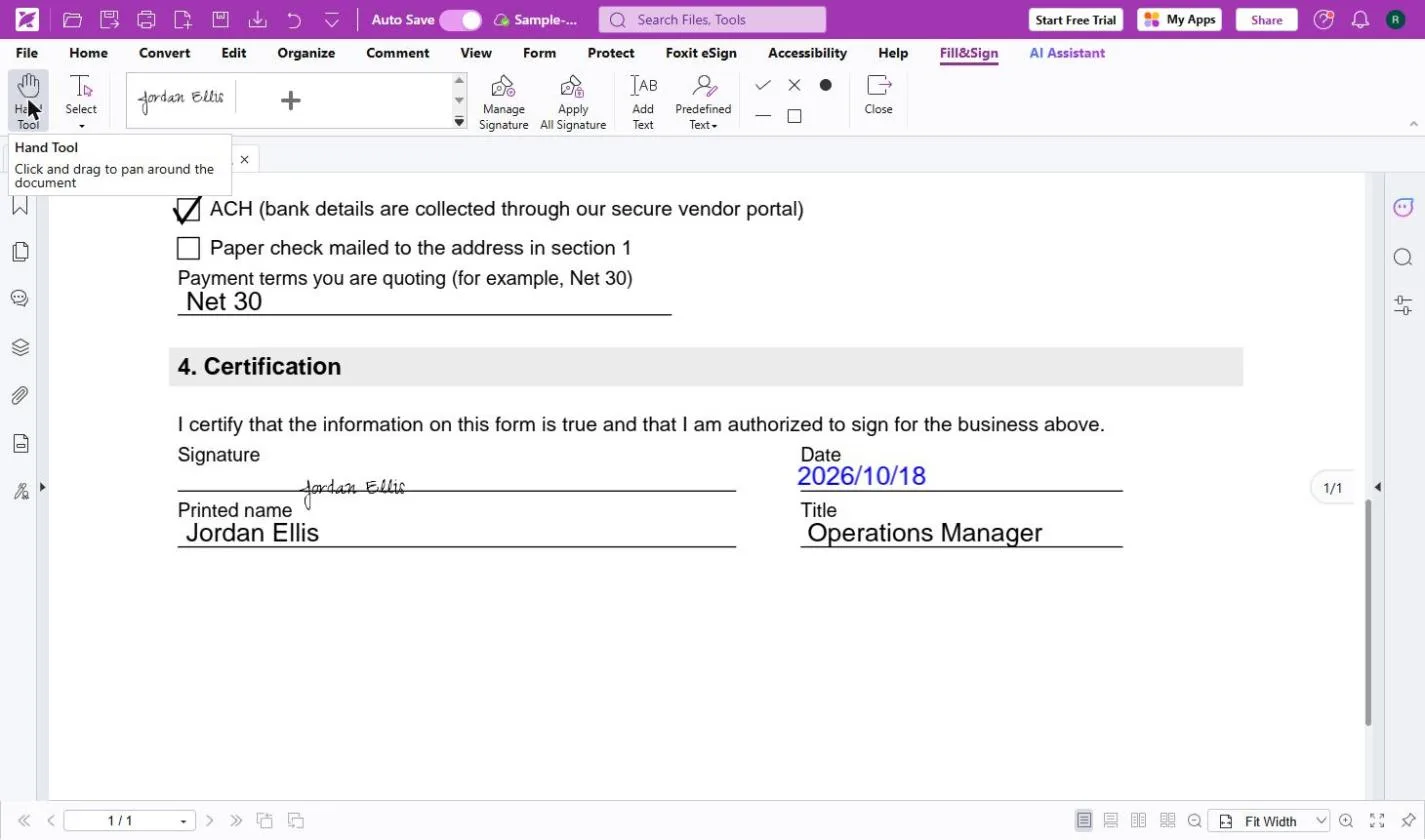
You help Jordan Ellis, operations manager at Bright Path Marketing, a made-up agency, return a new client's New Vendor Setup Form so the first $4,800 invoice can be paid.
You open the flat PDF in Foxit PDF Editor Cloud, use Fill & Sign to type on each line and tick the boxes, create a typed signature, place it, add today's date, apply it and download the form. The screens are real screenshots from my own Foxit account, captured October 2026.
What you need
- Nothing to start the practiceThe lesson is a practice copy. Bright Path Marketing, the client and the form are made up.
- Foxit PDF Editor, to do it for realPDF Editor is $129.99 per user per year and PDF Editor+ is $159.99 (foxit.com, October 2026). Every plan starts with a 14-day free trial with no credit card.
- The form as a PDFA sample vendor form is on the lesson's guide page.
Concepts
Text goes where you click
On a flat form there are no fields, so Add Text puts a box wherever you click. It stays on, so you can click one line after another. If a box is still open, your first click only closes it; click again to start the next one.
Make your signature once
Create Signature lets you type, draw, import an image, paste or use Online. Save signature online keeps it in your Foxit account for the next form; untick it on a shared computer.
Quick ink, certificate or eSign
Foxit's site separates quick ink signatures, like the one in this lesson, from legally binding digital certificate signatures. Collecting signatures from other people with a signing order and an audit trail is Foxit eSign, a separate service.
Do it for real
Now repeat it in your own account. Tick each step as you go.
Quick check
3 questions to check you’ve got it.
1. The form is a flat PDF with no boxes to type in. What do you use?
- Print it and scan it
- Fill & Sign with Add Text
- Retype the whole form in Word
Show the answer
Fill & Sign with Add Text. Add Text puts a text box wherever you click, so any PDF can be filled in.
2. You are signing on a client's shared computer. What should you do in Create Signature?
- Leave Save signature online ticked
- Untick Save signature online
- Use someone else's signature
Show the answer
Untick Save signature online. Unticking it keeps your signature out of that account.
3. You need three people to sign a contract in order, with an audit trail. Is Fill & Sign the right tool?
- Yes
- No, that is what Foxit eSign is for
Show the answer
No, that is what Foxit eSign is for. Fill & Sign is for you filling and signing. Foxit eSign sends documents to other signers with a signing order and an audit trail.
You reached the end of AI Back Office for Small Business
You filled and signed a client form in minutes. Review the course and pick the next back-office job to hand to a tool.
Pick your next course →