Why this matters
A small office usually tracks purchase orders in email threads and one shared spreadsheet. Nobody owns the list, so a vendor that runs late is found out after the deadline, and chasing orders eats a few hours every week.
SunSed is a website where you describe an app in plain words and it builds the pages, the database and the logins. In our test it built a working purchase order tracker from one description and three quick choices, in about four minutes. The AI will not build the same app twice, so your screens and credit counts will differ from ours.
Practice
Do every step yourself in a practice copy of the real tool. It checks your work, and “Do it for me” finishes any step you get stuck on.
What you’ll build
You help Dana Whitfield, who runs the office at Riverbend Office Services, a made-up company. Her purchase orders live in email and a spreadsheet, and last month a print vendor ran nine days late before anyone noticed.
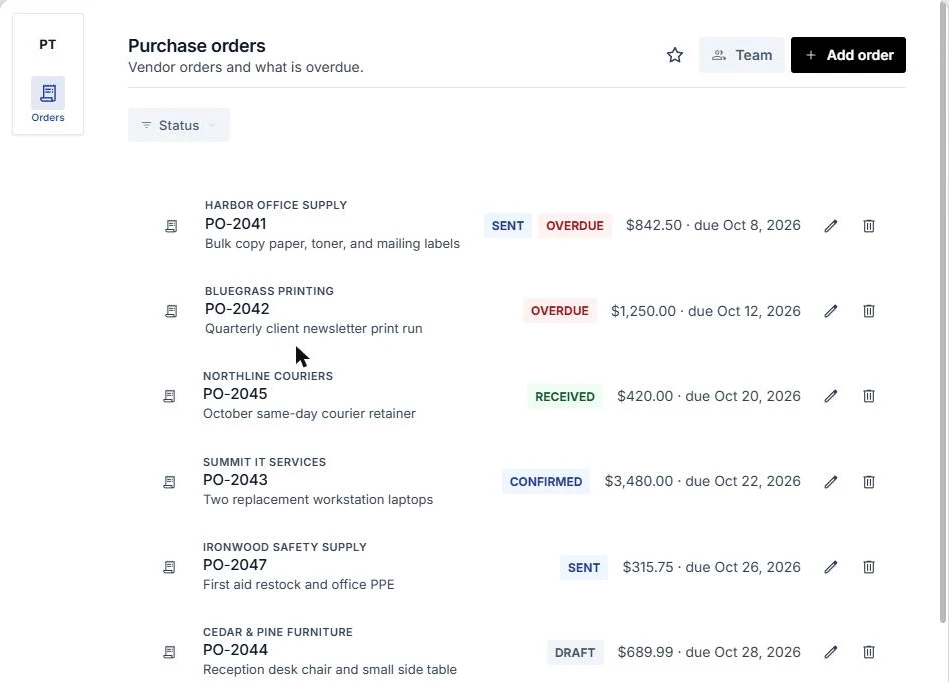
You describe a purchase order tracker to SunSed, answer three quick choices, watch it build, add made-up sample orders, filter to what is overdue, look at the order form and the Team list, and check what a signed-out stranger sees. The screens are real SunSed screenshots, captured October 2026.
What you need
- Nothing to start the practiceThe lesson is a practice copy built from real screenshots. Riverbend Office Services and every order are made up.
- A SunSed account, to do it for realSign up through my link, sunsed.com/?via=stepthrough (partner link, I may earn a commission, at no cost to you). Builder is $30 a month after a 7-day free trial, card required. Pricing is at sunsed.com/pricing. Use code STEPTHROUGH. Using the code STEPTHROUGH gives you 1,000 AI credits with your first payment.
- Made-up orders only, while you testAsk SunSed for fake sample orders first. Put real vendor details in only after you have checked who can sign in.
- A work email for the first adminUntil an admin email is on the Team list, the app shows a "not on the team" note and nobody can add or edit orders.
Concepts
Describe it like you would to a friend
SunSed starts with one question: what do you want to build? A sentence is enough, but more detail gets a closer first version. Ours named the fields on each order (PO number, vendor, description, amount, status, due date), asked for a table with a status filter and an overdue highlight, and said to require a login.
After that it asked three quick choices, such as how overdue orders are handled and who can add or edit. You can skip them and change anything later by chatting.
Test with fake data, then check who can get in
Ask for made-up sample records first. Our eight fake orders made the list, the Overdue label, the Status filter and the order form easy to judge.
Then look at who can open the app. Ours had a Team page with one admin, and a signed-out visitor only saw a public home page and an email and password sign-in. Our test app was never published. Publishing is a separate button, so decide who should see it first.
Your app will not match ours
The AI does not build the same app twice, so your pages, wording and credit count will differ from the screens in this lesson. Credits shown in our screenshots were for our build only. Judge yours against what you described.
Do it for real
Now repeat it in your own account. Tick each step as you go.
Quick check
3 questions to check you’ve got it.
1. You want to try a tracker with data in it before using real vendors. What do you ask SunSed for?
- Real orders copied from your email
- Made-up sample orders with fake vendors
- Nothing, an empty table is enough
Show the answer
Made-up sample orders with fake vendors. Fake records let you judge the list, the filter and the form without putting real vendor data into a test app.
2. Your screens do not match the lesson screenshots. What does that mean?
- You did something wrong
- The AI will not build the same app twice, so yours will differ
- The lesson is out of date
Show the answer
The AI will not build the same app twice, so yours will differ. SunSed builds a fresh version each time. Check yours against what you described, not against our screens.
3. Before you share the app link, what should you check?
- Who is on the Team list, and what a signed-out visitor sees
- How many credits are left
- Which color the Overdue label is
Show the answer
Who is on the Team list, and what a signed-out visitor sees. A login only helps if the right people are on the list. Test it signed out before you publish.