Why this matters
A small agency can run every certificate, policy change and billing question through one shared inbox. There is no status and no owner, and an urgent request looks like everything else until someone opens it.
Atoms builds a customer form and a staff dashboard from a description, for less than two free credits in our test. The building is the quick part. Testing it before a customer does is the job, and our test found four things worth fixing.
Practice
Do every step yourself in a practice copy of the real tool. It checks your work, and “Do it for me” finishes any step you get stuck on.
What you’ll build
You run a made-up insurance agency. You describe the app, send a request as a customer, work it as staff, and ask Atoms who can read the data.
Then you fix what the test found: a dashboard error, a broken heading, invented business details and a staff page that any signed-in account could open. The screens are real screenshots from my own Atoms Free plan, captured October 2026.
What you need
- Nothing to start the practiceThe lesson is a practice copy. The agency and its customers are made up.
- An Atoms account, to do it for realThe pricing page lists a Free plan with daily credits and 2 backend projects. Our whole build used under two credits. Check the current plans.
Concepts
A sign-in is not the same as permission
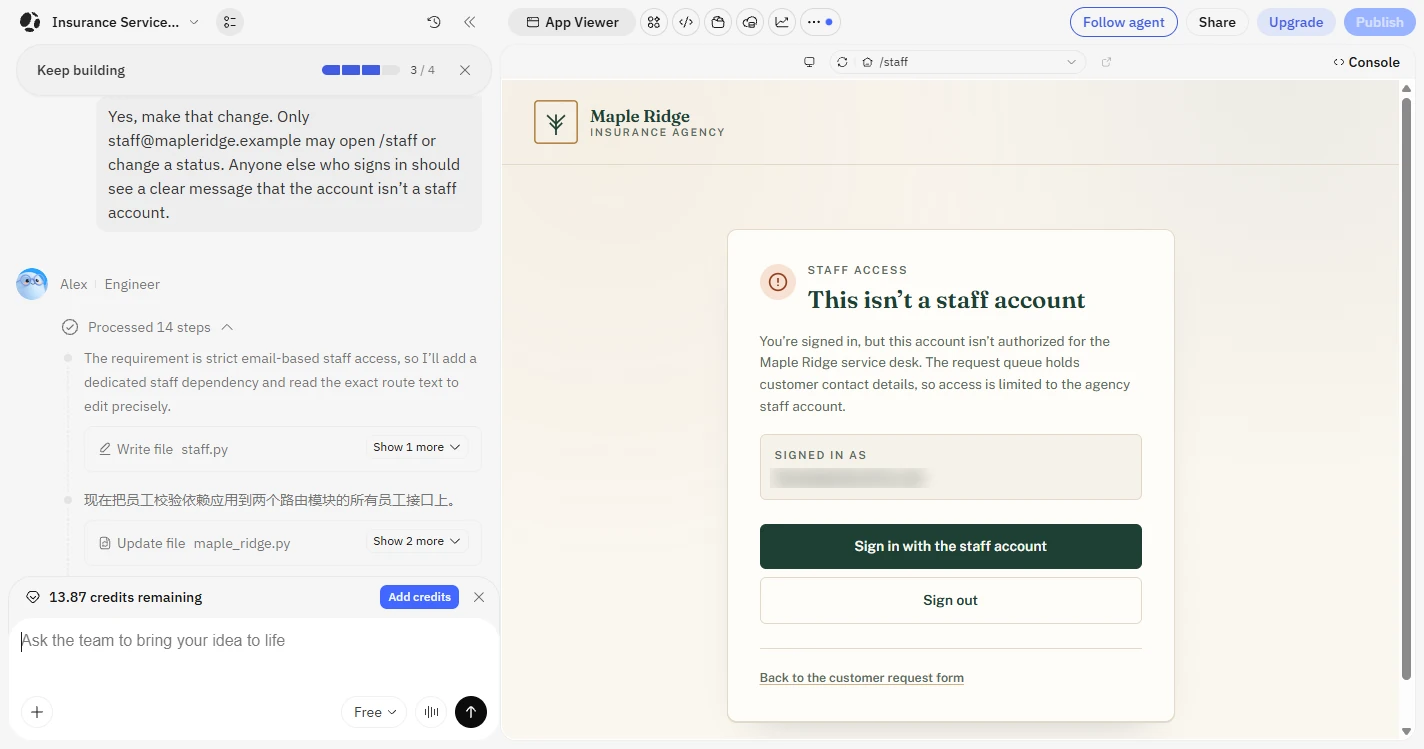
Our brief said customers must never see the staff dashboard, and the first version asked for a sign-in. When we asked who could open it, Atoms answered plainly: a person who creates a throwaway account could read every customer's name, email, policy number and request, and change statuses.
One message fixed it with a list of allowed staff emails, and our own account was then refused. Ask this question about any app you build, and always test with an account that should be turned away.
Read what you did not write
We never gave a phone number, opening hours or a founding year. Atoms wrote all three, plus a promise to reply usually the same day. Those lines look real to a customer, and a reply promise is a promise.
It also added six sample requests to the dashboard. They are useful for a first look, and they have to go before real use.
Try it as each person who will use it
As a customer, we sent an empty form and a real one. That found a code showing where an apostrophe should be. As staff, it found a dashboard error, which Atoms fixed through its Resolve button for about 0.2 credits.
As a stranger, it found the access gap. Each role found something the others did not, and none of it needed reading code.
Do it for real
Now repeat it in your own account. Tick each step as you go.
Quick check
3 questions to check you’ve got it.
1. The staff page asks people to sign in. What does that prove on its own?
- Only that they have an account
- That they work at your agency
- That they may read customer data
Show the answer
Only that they have an account. In our test, any account could get through until we limited the page to one staff email.
2. Your new page shows a phone number you never gave it. What should you do?
- Remove it or replace it with the real one
- Leave it, since the AI probably looked it up
- Publish and fix it later
Show the answer
Remove it or replace it with the real one. Atoms invented our phone number, hours and founding year. Customers would have believed them.
3. What is the best way to confirm the staff page is really locked?
- Try it with an account that should be refused
- Check that a sign-in button appears
- Ask a coworker if it looks secure
Show the answer
Try it with an account that should be refused. Seeing a real account get turned away shows the lock works. A sign-in button does not.