Why this matters
When a vendor or client sends "version 2" of a contract, the changes nobody mentions are the expensive ones: a fee, a notice period, a new sentence. Re-reading both versions side by side is slow, and your eye slides past a changed number.
Foxit PDF Editor's Compare lines up both PDFs and marks every replaced, inserted and deleted word, starting with a summary that counts them. You read only what changed, and you reply with a specific list.
Practice
Do every step yourself in a practice copy of the real tool. It checks your work, and “Do it for me” finishes any step you get stuck on.
What you’ll build
You help Dana Reyes, operations manager at Bright Path Marketing, a made-up agency, check version 2 of a software subscription agreement that the vendor called "small cleanups".
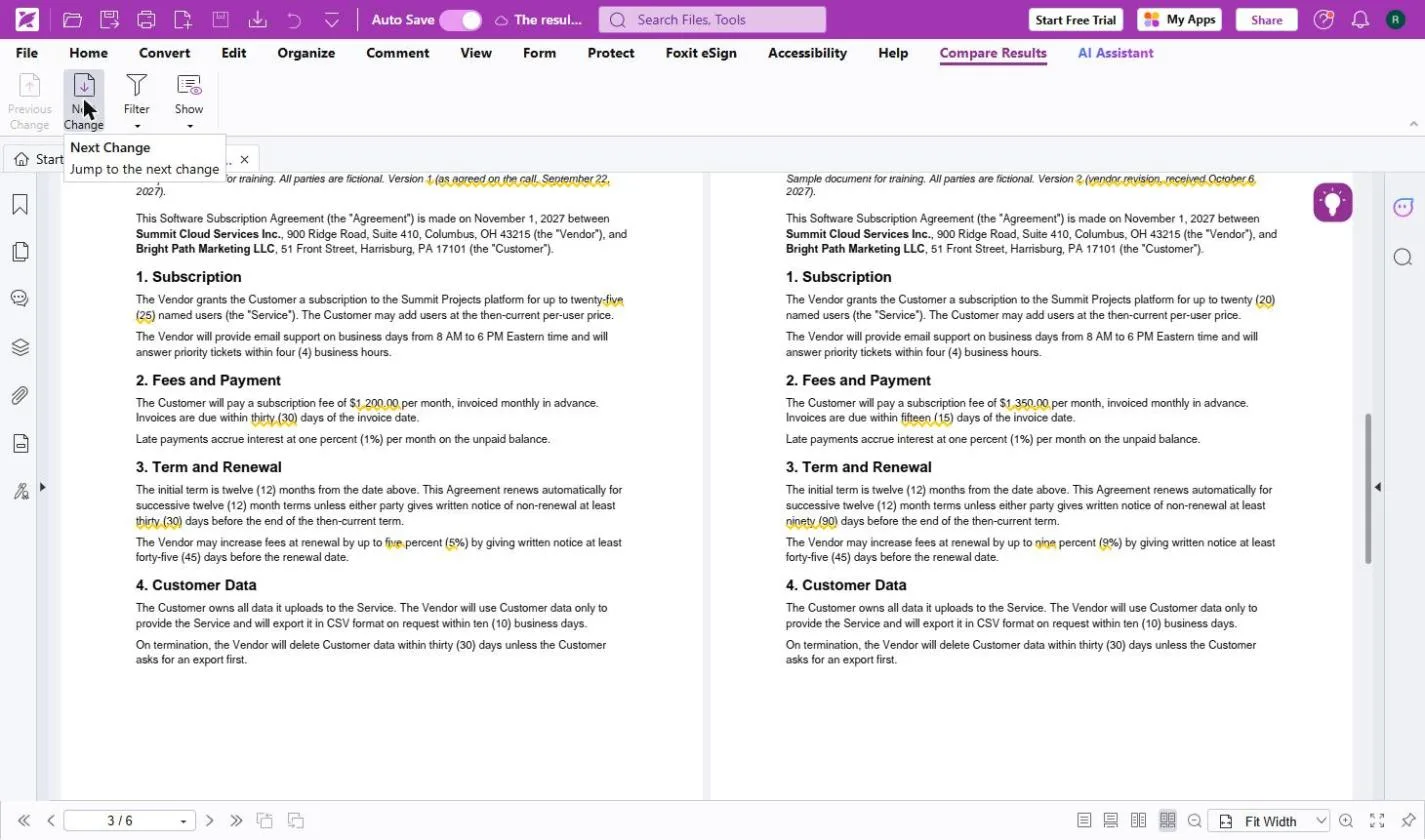
You open version 1 in Foxit PDF Editor Cloud, run Compare against version 2, read the 10-change summary, step through the fee, payment, notice, renewal-increase, new-clause and liability-cap changes, and open the list of old and new text. The screens are real screenshots from my own Foxit account, captured October 2026.
What you need
- Nothing to start the practiceThe lesson is a practice copy. Bright Path Marketing, the vendor and both contract versions are made up.
- Foxit PDF Editor, to do it for realfoxit.com lists Compare in PDF Editor ($129.99 per user per year) and PDF Editor+ ($159.99), and every plan starts with a 14-day free trial with no credit card.
- Both versions as PDFsThe one you agreed to and the new one. Two sample PDFs are on the lesson's guide page.
Concepts
Compare against the version you agreed
Compare is only as good as the old file you give it. Keep the version you agreed to, signed or not, and compare every new draft against that one, not against the other side's last draft.
Read the right side
Old is on the left and new is on the right. Replaced text has a yellow wavy underline, inserted text a blue underline and deleted text a red strike. Next Change stops on every mark in order, so nothing gets skipped.
Turn marks into a reply
The Comments panel lists every change with its old and new text. Copy the ones that matter into a short reply and ask the other side which they meant. Compare tells you what changed, not whether it is fair.
Do it for real
Now repeat it in your own account. Tick each step as you go.
Quick check
3 questions to check you’ve got it.
1. The vendor says version 2 has "only small cleanups". What should you compare it against?
- The vendor's previous draft
- The version you agreed to
- Nothing, trust the email
Show the answer
The version you agreed to. Compare against what you agreed. The other side's earlier draft may already contain changes you never accepted.
2. Foxit shows "9 replacements, 1 insertion". Where do you read what the contract says now?
- The left side
- The right side
- Only the summary page
Show the answer
The right side. The new version is on the right. The left shows what it used to say.
3. Compare marked a lower liability cap. What does that tell you?
- That the change is unfair
- That the text changed, so you should ask about it
- Nothing, caps do not matter
Show the answer
That the text changed, so you should ask about it. Compare shows what changed, not whether it is fair. Ask the other side, and a lawyer for anything large.
Foxit PDF Editor: Fill and Sign a Form without Printing
You caught every change. Next: close the loop and fill and sign a flat PDF form without printing it.
Start module 7 →